


 695f852f2f
* add numpy

* fix rotation on new game

* fix wide root zero

* edit INSTALL.md

* force hints on only if starting pondering

* readme

* edit README.md

* Check that the platform is Windows, and the user32 dll has the SetProcessDpiAwarenessContext function (should exist for all versions >= Vista).

Prevents blurry Kivy windows on high dpi displays. Reference: https://stackoverflow.com/questions/71704354/kivy-app-is-blurry-on-windows-with-high-resolution-screen

* Prevents blurry Kivy windows on high dpi displays.

Check that the platform is Windows, and the user32 dll has the SetProcessDpiAwarenessContext function (should exist for all versions >= Vista).

 Reference: https://stackoverflow.com/questions/71704354/kivy-app-is-blurry-on-windows-with-high-resolution-screen

* Use kivy.platform instead of the platform package.

* Fix bug when the board size is not square.

* Set log level back to "warning" (was changed by mistake in a previous commit).

* change pyinstaller icon file paths from fully qualified to relative, pointing to the ico file in the repository

* add VSVersionInfo metadata to Windows executable file from PyInstaller

* replace importLib modules with path modification and regular imports

* Initial code for analysis in move range (not working yet).

* Initial working code for move range analysis. Work in progress, i18n not done.

* Initial working code for move range analysis. Work in progress, i18n not done.

* Get rid of unnecessary code for getting dialog subwidgets.

* Implemented greyed-out inputs when the move range checkbox is not selected.

* Fix spacing which was changed by accident.

* edit katrain/popups.kv, edit katrain/gui/popups.py

* Fix invocation of game analysis.

* Added i18n for the move range analysis. i18n done for Russian.

* TODO removed for Russian.

* Translated remaining Russian strings which were TODO:.

* French strings for move range analysis.

* Change the way analyze_extra is called when move range is specified.

* scale=0 turns off

* allow 3.10

* edit .github/workflows/test.yaml

* Blended territory display (#556)

* Check that the platform is Windows, and the user32 dll has the SetProcessDpiAwarenessContext function (should exist for all versions >= Vista).

Prevents blurry Kivy windows on high dpi displays. Reference: https://stackoverflow.com/questions/71704354/kivy-app-is-blurry-on-windows-with-high-resolution-screen

* Prevents blurry Kivy windows on high dpi displays.

Check that the platform is Windows, and the user32 dll has the SetProcessDpiAwarenessContext function (should exist for all versions >= Vista).

 Reference: https://stackoverflow.com/questions/71704354/kivy-app-is-blurry-on-windows-with-high-resolution-screen

* Changed territory display to be smoothly blended, for player expected territories and for loss in teaching games.

Added an ownership mark to stones while displaying territory; the color of the mark indicates expected ownership, and the size of the mark is proportional to certainty.

* Fixed bug: blended territory display does not work with rotation.

* Revert "Prevents blurry Kivy windows on high dpi displays."

This reverts commit 1cff741e3f7b6bcd8fe7d25cdc9a3fddbcaea242.

* Revert "Check that the platform is Windows, and the user32 dll has the SetProcessDpiAwarenessContext function (should exist for all versions >= Vista)."

This reverts commit c9ae4f6432efe566bed11eb4a9575b19df0a0db2.

* Changed territory display to be smoothly blended, for player expected territories and for loss in teaching games.

Added an ownership mark to stones while displaying territory; the color of the mark indicates expected ownership, and the size of the mark is proportional to certainty.

Rebased blended territory display on the 1.12 branch.

* Fixed bug: blended territory display does not work with rotation.

Fixed for non-square board and rebased.

* Revert "Prevents blurry Kivy windows on high dpi displays."

This reverts commit 1cff741e3f7b6bcd8fe7d25cdc9a3fddbcaea242.

* Revert "Check that the platform is Windows, and the user32 dll has the SetProcessDpiAwarenessContext function (should exist for all versions >= Vista)."

This reverts commit c9ae4f6432efe566bed11eb4a9575b19df0a0db2.

* Make blended territory work with non-square boards and their rotations.

* Whitespace.

* Make blended territory work with non-square boards and their rotations.

* Change marks on stones from circles to squares.

* Add Theme settings enabling different types of territory and stone marks displays.

* Add Theme settings enabling different types of territory and stone marks displays.

* Reformatted with black -l 120.

* Documentation for territory display styles and themes.

* Added acknowledgement for game used in screenshots.

* spacing

* Some cleanup of Theme variables.

* Switch default mode back to "blended".

* Added screenshot of blended style - weak stone marks.

* Fix bold text.

Co-authored-by: Jacob Minsky <jacob.minsky@gmail.com>

* fix test yaml

* edit spec/file_version.py, edit katrain/core/game.py and 3 other changes

* edit katrain/core/constants.py

* Fixes and enhancements for the blended territory feature. (#564)

* Fix newly placed stone getting transparency before ownership is updated.

* Set black and white territory colors separately.

* Try dimming board when territory display is active.

* Change tint of the board when in territory estimate mode and style is "blended".

* Fix bug when loading SGF with initial position setup.

* Revert "Change tint of the board when in territory estimate mode and style is "blended"."

This reverts commit d5b46c8966d02b8660a2fe88e4c8d882af43f51f.

* Marks on stone should be stone colors, not ownership colors - which look bad.

* Version with new board texture (wood6.jpg from https://github.com/waltheri/wgo.js/tree/master/textures) and changed territory color parameters.

* Added gamma-correction to territory coloring.

* Add acknowledgement for board texture.

Co-authored-by: rzcp66 <jacob.minsky@gm.com>

* Remove numpy (#570)

* Fix newly placed stone getting transparency before ownership is updated.

* Set black and white territory colors separately.

* Try dimming board when territory display is active.

* Change tint of the board when in territory estimate mode and style is "blended".

* Fix bug when loading SGF with initial position setup.

* Revert "Change tint of the board when in territory estimate mode and style is "blended"."

This reverts commit d5b46c8966d02b8660a2fe88e4c8d882af43f51f.

* Marks on stone should be stone colors, not ownership colors - which look bad.

* Version with new board texture (wood6.jpg from https://github.com/waltheri/wgo.js/tree/master/textures) and changed territory color parameters.

* Added gamma-correction to territory coloring.

* Eliminates numpy; working version with rotation without numpy.

* Fixed stuff related to hover content and board rotation.

* Bug fix for roi selection without numpy.

* Added comment for rot90 implementation with lists.

* Use reversed() instead of [::-1] for clarity.

Co-authored-by: rzcp66 <jacob.minsky@gm.com>

* Fix region of interest display when board is rotated. (#572)

* themes

Co-authored-by: Sander Land <sander@chatdesk.com>
Co-authored-by: Sander Land <sander.land@cognite.com>
Co-authored-by: Jacob Minsky <jacob.minsky@gmail.com>
Co-authored-by: ulty4life <ulty4life@gmail.com>
Co-authored-by: Jacob Minsky <35696962+jacobm-tech@users.noreply.github.com>
Co-authored-by: rzcp66 <jacob.minsky@gm.com>
80 lines
4.9 KiB
Markdown
80 lines
4.9 KiB
Markdown
# Themes
|
|
|
|
Version 1.7 brings basic support for themes, and 1.9 extends it to include keyboard shortcuts and support for multiple theme files.
|
|
|
|
## Creating and editing themes
|
|
|
|
* Look at the `Theme` class in [`katrain/gui/theme.py`](https://github.com/sanderland/katrain/blob/master/katrain/gui/theme.py).
|
|
* Make a `theme<yourthemename>.json` file in your `<home dir>/.katrain` directory and specify any variables from the above class you want to override, e.g.
|
|
```json
|
|
{
|
|
"BACKGROUND_COLOR": [1,0,0,1],
|
|
"KEY_STOP_ANALYSIS": "f10",
|
|
"MISTAKE_SOUNDS": ["jeff.wav","what.wav"]
|
|
}
|
|
```
|
|
* All resources (including icons, which can not be renamed for now) will be looked up in `<home dir>/.katrain` first, so files with identical names there can be used to override sounds and images.
|
|
* If variables are specified in multiple theme files, the *latest* alphabetically takes precedence. That is, each later theme file overwrites the settings from any previous one.
|
|
|
|
## Expected territory options
|
|
|
|
* KaTrain supports different styles of display of expected territory:
|
|
* Blended style colors the board with an intensity proportional to the likelihood of a player controlling that territory at the end of the game.
|
|
* In the Marks style, each point of the board is marked with a square of size which is proportional to ownership likelihood.
|
|
* The Blocks style divides the whole board into black, white, and neutral territory, based on a likelihood threshold. This style is appropriate as a counting aid, but may be misleading before endgame if much of the territory is unsettled.
|
|
* Marks can also appear on stones to indicate the likelihood of these stones living at the end of the game. Three styles are supported:
|
|
* All stones can be marked, with the color of the mark indicating the expected ownership and the size of the mark indicating certainty.
|
|
* Weak stones only - marks will appear only on stones which are over 50% likely to die before the end of the game.
|
|
* No stone marks.
|
|
|
|
| <img src="https://raw.githubusercontent.com/jacobm-tech/katrain/blended-territory-display/themes/blended-all.png" width="400px"/><br><span style="font-weight:normal">Blended style, all stones marked</span> | <img src="https://raw.githubusercontent.com/jacobm-tech/katrain/blended-territory-display/themes/marks-weak.png" width="400px"/><br><span style="font-weight:normal">Marks on intersections, weak stones marked</span> |
|
|
|:-------------------------------------------------------------------------------------------------------------------------------------------------------------------------------------------------------------:|:----------------------------------------------------------------------------------------------------------------------------------------------------------------------------------------------------------------------:|
|
|
| <img src="https://raw.githubusercontent.com/jacobm-tech/katrain/blended-territory-display/themes/blocks-none.png" width="400px"/><br>Territory blocks, no stones marked | <img src="https://raw.githubusercontent.com/jacobm-tech/katrain/blended-territory-display/themes/blended-weak.png" width="400px"/><br>Blended territory, weak stones marked |
|
|
|
|
|
|
<sup>The game used in the screenshots is [Albert Yen vs. Eric Yoder](https://www.usgo.org/news/2022/03/members-edition-midwest-open-round-2-the-broken-ladder-game).</sup>
|
|
|
|
The stone marks and territory style are independent; the table above presents 4 possible variants out of 9.
|
|
The relevant variables are:
|
|
```
|
|
TERRITORY_DISPLAY = "blended" | "marks" | "blocks"
|
|
STONE_MARKS = "all" | "weak" | "none"
|
|
OWNERSHIP_MAX_ALPHA = 0.7
|
|
BLOCKS_THRESHOLD = 0.6
|
|
MARK_SIZE = 0.42 # as fraction of stone size
|
|
```
|
|
|
|
## Installation
|
|
|
|
* To install a theme, simply unzip the theme.zip to your .katrain folder.
|
|
* On Windows you can find it in C:\Users\you\\.katrain and on linux in ~/.katrain.
|
|
* When in doubt, the general settings dialog will also show the location.
|
|
* To uninstall a theme, remove theme.json and all relevant images from that folder.
|
|
|
|
## Available themes
|
|
|
|
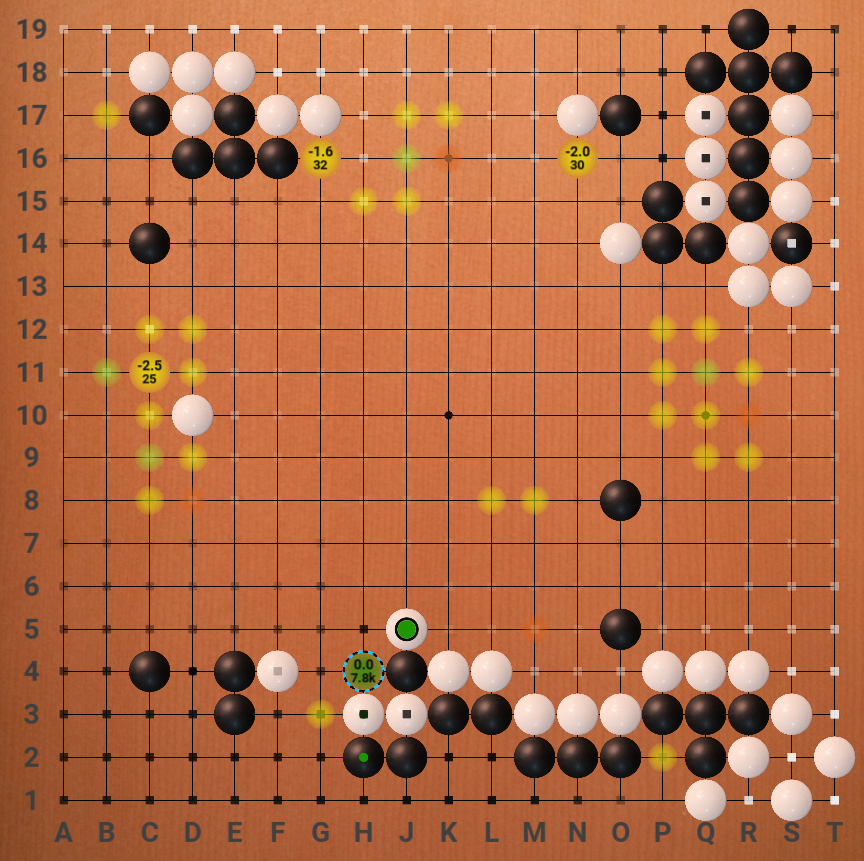
### Alternate board/stones theme by "koast"
|
|
|
|
[Download](https://github.com/sanderland/katrain/blob/master/themes/koast-theme.zip)
|
|
|
|
|
|
|
|
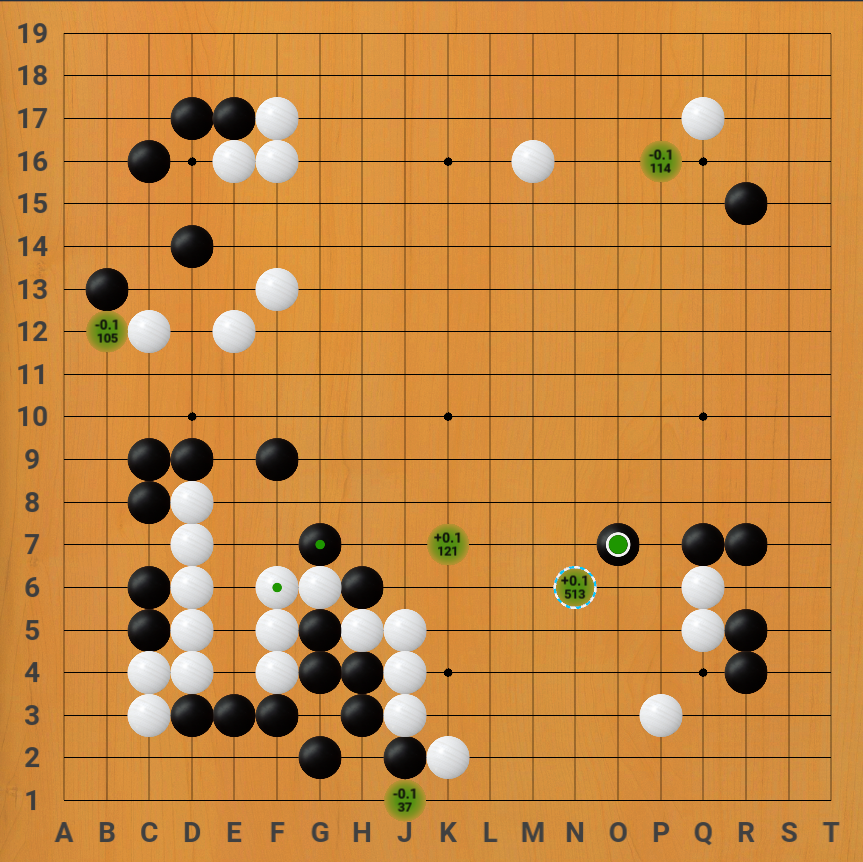
### Lizzie-like theme
|
|
|
|
* Theme created by Eric W, includes modified board, stones
|
|
* Images taken from [Lizzie](https://github.com/featurecat/lizzie/) by featurecat and contributors.
|
|
* Hides hints for low visit/uncertain moves instead of showing small dots.
|
|
|
|
[Download](https://github.com/sanderland/katrain/blob/master/themes/eric-lizzie-look.zip)
|
|
|
|
|
|
|
|
|
|
### Jeff sounds
|
|
|
|
* This theme makes Jeff comment `Ahhh?` and `What?!` when you make mistakes.
|
|
* Sounds provided by Mikkgo.
|
|
|
|
[Download](https://github.com/sanderland/katrain/blob/master/themes/jeff-sounds.zip)
|
|
|