


 fc038efac3
* Restore shaded territory display as a themeable option (#581)

* Add shaded territory theme

* fix max alpha docs

* Document new theme option, improve screenshots and md

* Fix detail about number of examples.

* Bump pillow from 9.0.1 to 9.3.0 (#579)

Bumps [pillow](https://github.com/python-pillow/Pillow) from 9.0.1 to 9.3.0.
- [Release notes](https://github.com/python-pillow/Pillow/releases)
- [Changelog](https://github.com/python-pillow/Pillow/blob/main/CHANGES.rst)
- [Commits](https://github.com/python-pillow/Pillow/compare/9.0.1...9.3.0)

---
updated-dependencies:
- dependency-name: pillow
  dependency-type: direct:production
...

Signed-off-by: dependabot[bot] <support@github.com>

Signed-off-by: dependabot[bot] <support@github.com>
Co-authored-by: dependabot[bot] <49699333+dependabot[bot]@users.noreply.github.com>

* Bump certifi from 2020.12.5 to 2022.12.7 (#588)

Bumps [certifi](https://github.com/certifi/python-certifi) from 2020.12.5 to 2022.12.7.
- [Release notes](https://github.com/certifi/python-certifi/releases)
- [Commits](https://github.com/certifi/python-certifi/compare/2020.12.05...2022.12.07)

---
updated-dependencies:
- dependency-name: certifi
  dependency-type: direct:production
...

Signed-off-by: dependabot[bot] <support@github.com>

Signed-off-by: dependabot[bot] <support@github.com>
Co-authored-by: dependabot[bot] <49699333+dependabot[bot]@users.noreply.github.com>

* Teaching loss fix (#587)

* Loss during teaching games was not displayed.

* Loss during teaching games was not displayed.

* First version with working fixes.

* Enables loss coloring when undoing a move in a teaching game.

* Enables loss coloring when undoing a move in a teaching game.

* Enables loss coloring when undoing a move in a teaching game.

* Enables loss coloring when undoing a move in a teaching game.

* fix bug, weak default

* no transparency default

* low transparency default

* new katago

* linux exe

* black

Signed-off-by: dependabot[bot] <support@github.com>
Co-authored-by: Miles Crawford <miles@milescrawford.com>
Co-authored-by: dependabot[bot] <49699333+dependabot[bot]@users.noreply.github.com>
Co-authored-by: Jacob Minsky <35696962+jacobm-tech@users.noreply.github.com>
Co-authored-by: Sander Land <sander.land@cognite.com>
Co-authored-by: Sander Land <sander@chatdesk.com>
87 lines
4.6 KiB
Markdown
87 lines
4.6 KiB
Markdown
# Themes
|
|
|
|
Version 1.7 brings basic support for themes, and 1.9 extends it to include keyboard shortcuts and support for multiple theme files.
|
|
|
|
## Creating and editing themes
|
|
|
|
* Look at the `Theme` class in [`katrain/gui/theme.py`](https://github.com/sanderland/katrain/blob/master/katrain/gui/theme.py).
|
|
* Make a `theme<yourthemename>.json` file in your `<home dir>/.katrain` directory and specify any variables from the above class you want to override, e.g.
|
|
```json
|
|
{
|
|
"BACKGROUND_COLOR": [1,0,0,1],
|
|
"KEY_STOP_ANALYSIS": "f10",
|
|
"MISTAKE_SOUNDS": ["jeff.wav","what.wav"]
|
|
}
|
|
```
|
|
* All resources (including icons, which can not be renamed for now) will be looked up in `<home dir>/.katrain` first, so files with identical names there can be used to override sounds and images.
|
|
* If variables are specified in multiple theme files, the *latest* alphabetically takes precedence. That is, each later theme file overwrites the settings from any previous one.
|
|
|
|
## Expected territory options
|
|
|
|
* KaTrain supports different styles of display of expected territory:
|
|
* Blended style colors the board with an intensity proportional to the likelihood of a player controlling that territory at the end of the game.
|
|
* Shaded style behaves the same as Blended, but uses square shades similar to
|
|
the Katago paper.
|
|
* In the Marks style, each point of the board is marked with a square of size which is proportional to ownership likelihood.
|
|
* The Blocks style divides the whole board into black, white, and neutral territory, based on a likelihood threshold. This style is appropriate as a counting aid, but may be misleading before endgame if much of the territory is unsettled.
|
|
* Marks can also appear on stones to indicate the likelihood of these stones living at the end of the game. Three styles are supported:
|
|
* All stones can be marked, with the color of the mark indicating the expected ownership and the size of the mark indicating certainty.
|
|
* Weak stones only - marks will appear only on stones which are over 50% likely to die before the end of the game.
|
|
* No stone marks.
|
|
* Stones can also be made transparent based on their strength.
|
|
|
|
| <img src="./themes/blended-all.png" width="400"/> <br> Blended style, all stones marked| <img src="./themes/shaded-all.png" width="400"/> <br> Shaded style, all stones marked |
|
|
| --- | ---|
|
|
| <img src="./themes/blocks-none.png" width="400"/> <br> Territory blocks, no stones marked | <img src="./themes/blended-weak.png" width="400"/> <br> Blended territory, weak stones marked |
|
|
| <img src="./themes/marks-weak.png" width="400"/> <br> Marks on intersections, weak stones marked | <img src="./themes/shaded-no-alpha.png" width="400"/> <br> Shaded, no stone alpha |
|
|
|
|
|
|
<sup>The game used in the screenshots is [Albert Yen vs. Eric Yoder](https://www.usgo.org/news/2022/03/members-edition-midwest-open-round-2-the-broken-ladder-game).</sup>
|
|
|
|
The stone marks, transparency, and territory style are independent; the table above presents a collection of possible variants.
|
|
The relevant variables are:
|
|
```
|
|
TERRITORY_DISPLAY = "blended" | "shaded" | "marks" | "blocks"
|
|
STONE_MARKS = "all" | "weak" | "none"
|
|
OWNERSHIP_COLORS = {"B": [0.0, 0.0, 0.10, 0.75], "W": [0.92, 0.92, 1.0, 0.800]}
|
|
BLOCKS_THRESHOLD = 0.6
|
|
MARK_SIZE = 0.42 # as fraction of stone size
|
|
STONE_MIN_ALPHA = 0.5
|
|
```
|
|
|
|
The colors are specified as RGB values and a maximum alpha transparency.
|
|
|
|
## Installation
|
|
|
|
* To install a theme, simply unzip the theme.zip to your .katrain folder.
|
|
* On Windows you can find it in C:\Users\you\\.katrain and on linux in ~/.katrain.
|
|
* When in doubt, the general settings dialog will also show the location.
|
|
* To uninstall a theme, remove theme.json and all relevant images from that folder.
|
|
|
|
## Available themes
|
|
|
|
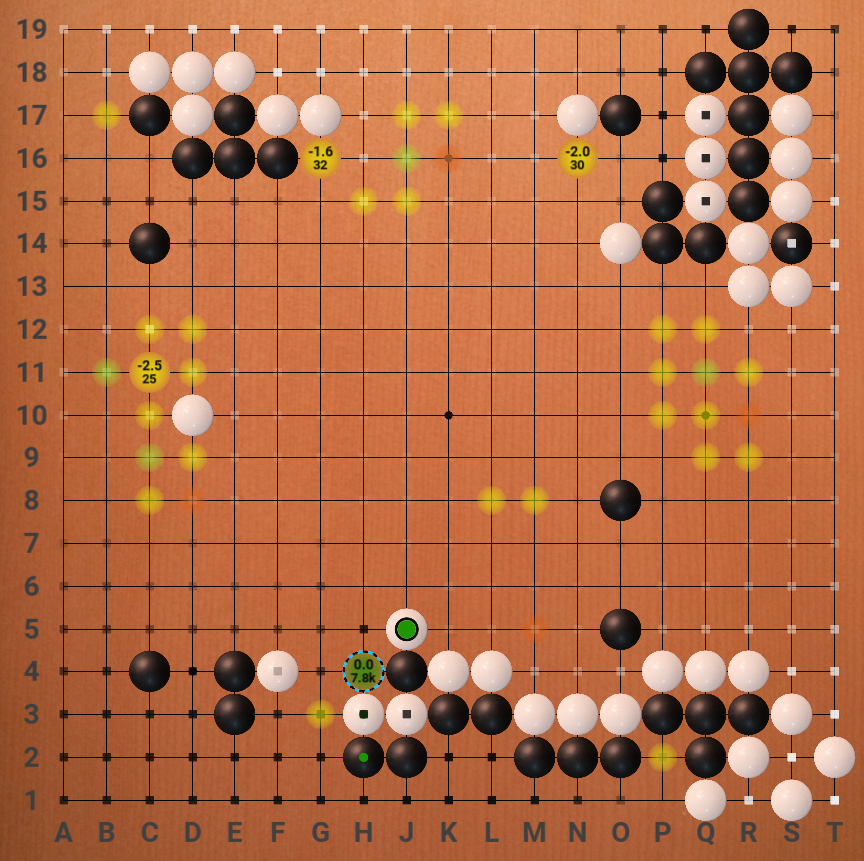
### Alternate board/stones theme by "koast"
|
|
|
|
[Download](https://github.com/sanderland/katrain/blob/master/themes/koast-theme.zip)
|
|
|
|
|
|
|
|
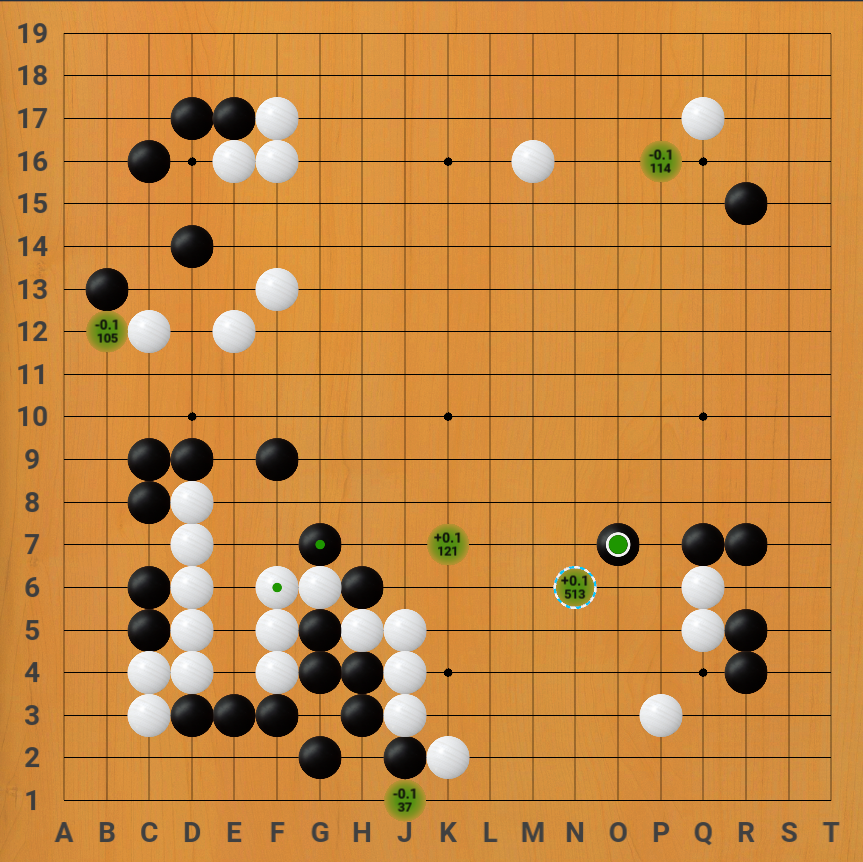
### Lizzie-like theme
|
|
|
|
* Theme created by Eric W, includes modified board, stones
|
|
* Images taken from [Lizzie](https://github.com/featurecat/lizzie/) by featurecat and contributors.
|
|
* Hides hints for low visit/uncertain moves instead of showing small dots.
|
|
|
|
[Download](https://github.com/sanderland/katrain/blob/master/themes/eric-lizzie-look.zip)
|
|
|
|
|
|
|
|
|
|
### Jeff sounds
|
|
|
|
* This theme makes Jeff comment `Ahhh?` and `What?!` when you make mistakes.
|
|
* Sounds provided by Mikkgo.
|
|
|
|
[Download](https://github.com/sanderland/katrain/blob/master/themes/jeff-sounds.zip)
|
|
|